

Increase The Effectiveness Of Your Sage eCommerce Solution With Custom Fields
Table of Contents
When building a Safe 300 (formerly known as Accpac) or Sage X3 integrated eCommerce business, it is important to know different eCommerce providers offer different features and functionalities within their Sage eCommerce solutions. You should consider which features are most important to you when selecting your Sage eCommerce integration provider to ensure your eCommerce solution meets your business needs. commercebuild offers many different features and one key feature is custom fields. With custom fields at item, customer, ship-to, order line and order header level, you now have great tools at your fingertips.
Item-level custom fields are used to display item attributes. For example, these include: color, size, material, dimensions, year, make, and model. The data in the fields are searchable too, so you can really help your Sage webstore users find the items they’re looking for. Item-level custom fields are also used to control webstore behaviour including:
- Enforcing minimum and maximum order quantities of an item
- Flagging items for pre-order only
- Controlling the quantity of an item that can be purchased in a given timeframe (e.g. 5 per week)
- Requiring the webstore user to enter a valid code as authority to purchase an item (e.g. a license number)
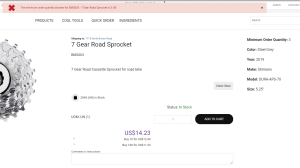
For a Minimum Order Quantity, the user must order at least the MOQ specified (above)
Customer and ship-to-level custom fields can be used to pre-determine your optimum ship-from warehouse for dispatching orders. Additionally, order-level custom fields can be used to capture information from Sage X3 or 300 webstore users as they proceed throughout the checkout process.
With order-level custom fields, you may wish to prompt the user to:
- Indicate if the order should be shipped when all items are in stock or can be partially shipped
- Provide information about their own shipper
- Determine the urgency of an order
- Indicate if special shipping options are required such as heavy lifting equipment

Custom Fields can be displayed to the webstore user on the item page (above)
Many possibilities open up with the implementation of custom fields within a commercebuild Sage 300 or X3 integrated eCommerce webstore. The values held in the fields can be imported from easy-to-manage Excel spreadsheets or might be automatically synchronized with your ERP system. This is a great addition to any webstore and our eCommerce experts can easily implement the custom fields functionality to work within your business needs..
So when you are considering starting your digital transformation journey with a Sage eCommerce integration, be sure to consider whether your chosen eCommerce B2B platform provider offers certain features and functionalities, such as custom fields. These can be of huge value to your Sage X3 and 300 eCommerce business, by making it easier for customers to easily find their desired product and therefore increase the chances of them purchasing from you.
If you are interested in learning more about the features and functionalities of a commercebuild webstore and how this could be of benefit to your Sage-run business, book a free demo and let us show you!
About commercebuild
commercebuild is the missing piece in transforming your ERP data into a truly personalized eCommerce experience. Flexible and frictionless, our turnkey eCommerce solution delivers 24/7 revenue opportunities to you and your customers. Quick to deploy and easy-to-use, we eliminate the need for middleware between the storefront and ERP data to enable seamless online buying and selling.
Our solutions can be live in 30-days and offer complete eCommerce capabilities at a price B2B and B2C businesses can afford.
Drive revenue growth for you, and your customers, while enjoying rapid ROI for both. Go head-to-head with the online retail giants of the world, and win. Experience a solution that integrates with your ERP data and provides automagical cross-sell and upsell opportunities to every customer on your site.
At the height of ecommerce growth, commercebuild offers scalable, reliable, and robust eCommerce solutions for everyone.
If your business is using Sage 300, Sage X3 or Microsoft Dynamics 365 Business Central ERPs, commercebuild can build a ERP-driven B2B and B2C eCommerce webstore or Customer Portal.