

Optimizing Your Google Shopping Campaigns with commercebuild’s Product Data Feed for a Winning Merchant Center Catalog
Table of Contents
- A Deep Dive into Google Shopping Campaigns
- What Is Google Merchant Center?
- Optimizing Product Descriptions for Google Merchant Center
- Using commercebuild’s Product Data Feed for Google Merchant Center
- Avoiding Common Google Merchant Center Pitfalls
- Future Opportunities: AI-Driven Enhancements for commercebuild
- Staying Competitive on Google Shopping
- About commercebuild
Imagine this scenario: Your online business is booming, and products are flying off the shelves. Then, out of the blue, your Google Merchant Center account gets suspended. The reasons? Perhaps your product descriptions are too brief, your images fail to meet the guidelines, or there are inconsistencies in your sales tax calculations. Suddenly, your eCommerce operations come to a halt due to overlooked details in your Google Shopping Campaign setup.
Unfortunately, this situation is all too common for eCommerce businesses that don’t manage their Google Merchant Center compliance carefully.
Now, consider this: Your Google Merchant Center catalog is up and running smoothly again, with your products prominently displayed across Google’s extensive network. What changed? You used commercebuild’s built-in product data feed to create a streamlined, compliant Google Shopping Campaign. However, getting to this point requires a thorough understanding of Google Merchant Center’s requirements and a strategic approach to avoid common mistakes. Let’s dive into how you can turn your Google Shopping Campaign from a potential risk into a powerful asset for your business.
A Deep Dive into Google Shopping Campaigns
Google Shopping campaigns are a form of paid advertising that allows eCommerce businesses to promote their products across Google’s platforms, including Search Engine Results Pages (SERPs), Google Images, YouTube, and the Google Display Network. For B2C eCommerce companies, these campaigns are essential for getting products in front of consumers who are actively searching for similar items.
There are three main types of Google Shopping campaigns:
- Standard Shopping Campaigns: These traditional campaigns give advertisers more control over settings like bid adjustments, negative keywords, and ad scheduling. They require more hands-on management but offer greater customization.
- Smart Shopping Campaigns: Launched in 2018, these campaigns use machine learning to automate bidding, ad placement, and other optimizations across Google’s properties. They require less manual effort but offer less control than Standard campaigns.
- Performance Max Campaigns: Introduced in 2021, Performance Max campaigns are the most automated. They use Google’s machine learning to optimize across all Google inventory (Search, Display, YouTube, Gmail, Maps) to maximize conversions. Performance Max offers the least control but promises better results with minimal setup.
Each type of campaign has its own strengths, and the right choice depends on your goals, resources, and how much control you need. Standard campaigns are ideal for those who prefer a hands-on approach, while Smart and Performance Max campaigns cater to advertisers seeking automation and simplicity.
Google Shopping campaigns are particularly effective for targeting customers in the middle (MoFu) and bottom (BoFu) of the sales funnel, where users are closer to making a purchase decision. However, they are less effective for top-of-the-funnel (ToFu) marketing, as they rely on product data feeds and Google’s algorithms rather than keyword targeting.
What Is Google Merchant Center?
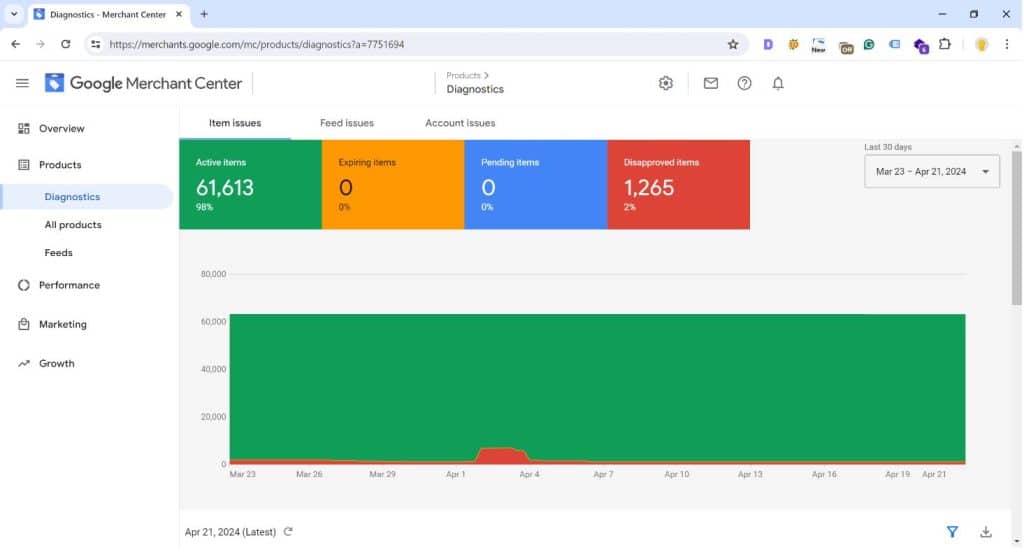
To run Google Shopping campaigns, eCommerce businesses must first establish a Google Merchant Center account. Google Merchant Center allows merchants to upload and manage their product data feeds, which are then used to generate Shopping ads.
Key components of Google Merchant Center include:
- Primary Data Feed: This main feed contains all the required product information, such as titles, descriptions, images, prices, and availability.
- Supplemental Data Feed: An optional secondary feed that can enhance or override specific attributes in the primary feed, such as promotions or inventory updates.
Before submitting feeds to Merchant Center, merchants must ensure their product data adheres to Google’s policies. Once approved, this data can be used to create and run Shopping campaigns across Google’s network.
The accuracy of the product names, descriptions, and other attributes provided to Google Merchant Center is critical for optimizing a Google Shopping Campaign. Google’s algorithms use this information to match products with relevant audiences, and by providing detailed, accurate data, advertisers can improve ad relevancy and boost conversion rates.
Optimizing Product Descriptions for Google Merchant Center
Product descriptions are crucial for optimizing listings on Google Shopping, as they significantly influence impressions, clicks, and conversions. Here’s why:
- Search Relevance and Visibility: Detailed product descriptions with relevant keywords help Google better understand your product and match it to relevant search queries, increasing the likelihood of your product appearing in search results.
- Driving Conversions: Persuasive product descriptions that highlight features, benefits, and unique selling points can convince potential customers to make a purchase, thus improving conversion rates.
Using commercebuild’s Product Data Feed for Google Merchant Center
commercebuild offers built-in functionality to generate a Structured Product Data Feed that is compatible with Google Merchant Center. This feed includes essential product attributes like part numbers, UPCs, prices, descriptions, images, and availability. However, it may lack certain attributes, such as brand names and shipping weights, which are necessary for full compliance with Google’s requirements.
To ensure maximum flexibility and compliance, commercebuild merchants should consider using a Google Sheet as the Primary Feed and the commercebuild data feed as the Supplemental Feed. This setup allows merchants to:
- Control Product Assortment: Select specific products to include in the Google Merchant Center Catalog.
- Enhance Product Data: Easily add attributes like brand names and shipping weights, which are not included in the commercebuild feed but are required by Google.
Avoiding Common Google Merchant Center Pitfalls
When using commercebuild for Google Merchant Center, watch out for the following pitfalls:
- Product Descriptions: commercebuild’s product descriptions are limited to 255 characters, whereas Google allows up to 5,000 characters. Shorter descriptions may not rank as well as more detailed ones.
- Product Images: Google has strict guidelines for product images, which must not contain overlays or placeholders. Additionally, because commercebuild uses a Content Delivery Network (CDN), image updates may take time to reflect across Google’s platforms.
- Global Trade Identification Numbers (GTINs): Products missing UPC or EAN-13 codes may have reduced visibility on Google Shopping.
- Sales Tax and Shipping Charges: Discrepancies between commercebuild and Google Merchant Center calculations can lead to account suspensions.
Future Opportunities: AI-Driven Enhancements for commercebuild
Artificial intelligence (AI) offers exciting possibilities for enhancing eCommerce platforms like commercebuild. Integrating AI could automate and improve tasks such as generating detailed product descriptions and enriching product data feeds.
For example, an AI-driven feature could automatically generate detailed, compliant product descriptions using existing product information, saving merchants time and ensuring consistency across their product catalog.
Additionally, AI could help merchants meet Google Merchant Center’s requirements by identifying gaps in product attributes and suggesting corrective actions, thereby avoiding potential suspensions.
Staying Competitive on Google Shopping
In the competitive world of Google Shopping, staying ahead requires constant vigilance. Regularly review your Google Merchant Center dashboard and product data feeds, stay updated on Google’s policy changes, and continually refine your campaigns. By leveraging commercebuild’s product data feed and mastering the intricacies of Google Merchant Center, you can transform your Google Shopping Campaign into a powerful revenue-generating tool that consistently delivers results.
With the right strategy, your eCommerce business can thrive on Google Shopping, driving sales and expanding your brand’s presence in the digital marketplace.
Please contact us if you need help or clarification in enabling, setting up, and managing functionalities on your commercebuild-powered website. Our team of experienced SEO professionals is always ready to assist you. We understand the intricacies of the commercebuild platform and can help you navigate its features to optimize your SEO performance.
Should you need help or clarification in enabling, setting up, and managing functionalities on your commercebuild-powered website, do not hesitate to contact us. Our team of experienced SEO professionals is always ready to assist you. We understand the intricacies of the commercebuild platform and can help you navigate its features to optimize your SEO performance.
About commercebuild
commercebuild is the missing piece in transforming your ERP data into a truly personalized eCommerce experience. Flexible and frictionless, our turnkey eCommerce solution delivers 24/7 revenue opportunities to you and your customers. Quick to deploy and easy-to-use, we eliminate the need for middleware between the storefront and ERP data to enable seamless online buying and selling.
Our solutions can be live in 30-days and offer complete eCommerce capabilities at a price B2B and B2C businesses can afford.
Drive revenue growth for you, and your customers, while enjoying rapid ROI for both. Go head-to-head with the online retail giants of the world, and win. Experience a solution that integrates with your ERP data and provides automagical cross-sell and upsell opportunities to every customer on your site.
At the height of ecommerce growth, commercebuild offers scalable, reliable, and robust eCommerce solutions for everyone.
If your business is using Sage 300, Sage X3 or Microsoft Dynamics 365 Business Central ERPs, commercebuild can build a ERP-driven B2B and B2C eCommerce webstore or Customer Portal.


